



Wireless chargers are now common products in phone accessory stores.
Some are small charging pads. Others are magnetic chargers, charging stands, or 3-in-1 charging stations.
These products often have simple shapes. When many chargers sit together on a shelf, shoppers may not understand what makes each one different.
A wireless charger display stand can help stores show these products in a clearer way.
It gives each charger a place and can help customers understand how the product works.
For electronics brands, importers, and retail chains, a well-designed display also makes it easier to present the same products in many stores.
This guide explains how to choose a wireless charger display for retail use, including design, product holders, cable management, and bulk ordering.
What Is a Wireless Charger Display Stand?
A wireless charger display stand is a retail fixture used to hold and present wireless charging products.
It can be a small countertop stand or a larger display for several charging products.
A basic display may only show the charger and its package.
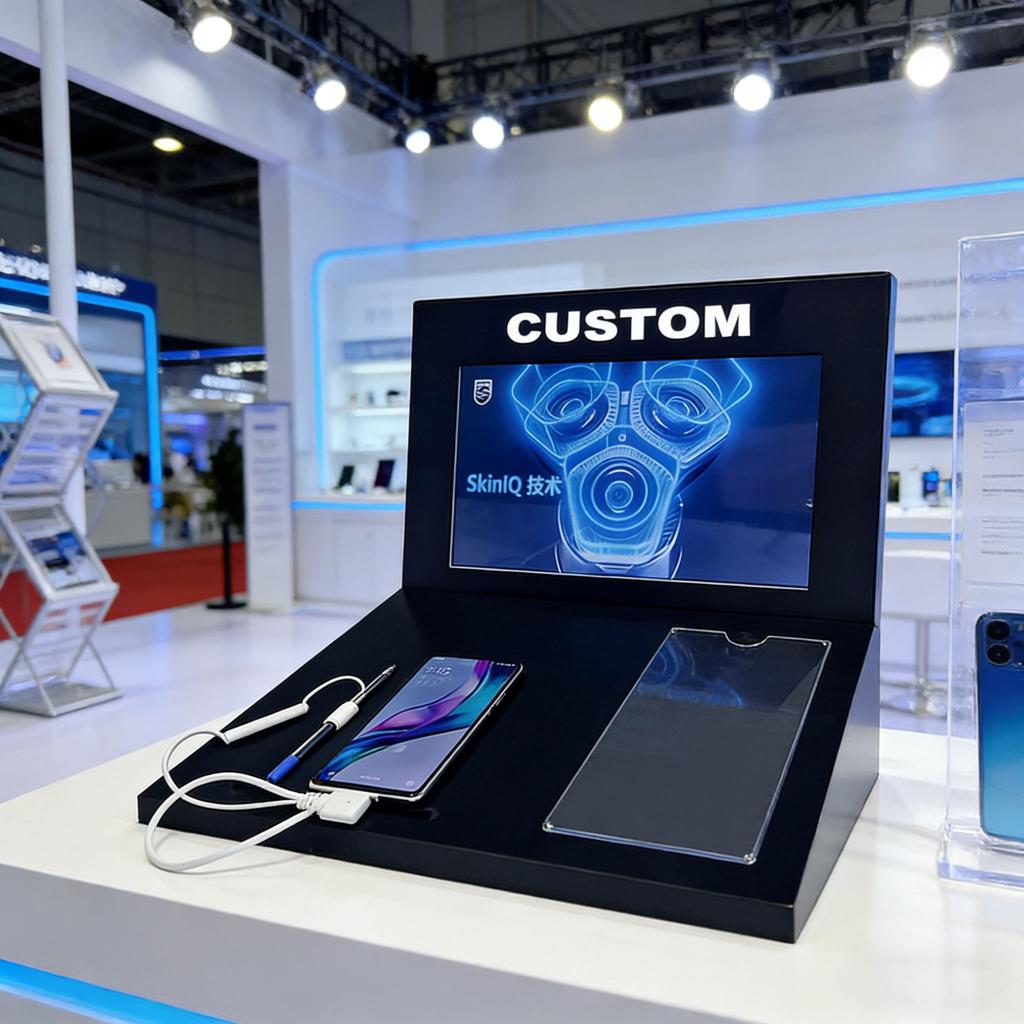
A demo display may allow customers to place a compatible phone on the charger and see how it works.
The display itself does not need to provide charging power. It may simply hold a separate charger, or it may include a suitable power connection for a working demo.
The right choice depends on the products and the store.
What Types of Wireless Charger Displays Are Available?
Not every wireless charger needs the same display design.
A magnetic phone charger is different from a flat charging pad. A 3-in-1 charging station may need even more space.
| Display Type | Best For | Main Feature |
|---|---|---|
| Countertop acrylic stand | One or two charger models | Compact design |
| Multi-product display | Several charging products | Easy comparison |
| Charging demo stand | Working charger samples | Hands-on experience |
| Hook display rack | Boxed chargers | Holds packaged stock |
| Lockable display | Higher-value products | Controlled access |
A countertop display is useful when store space is limited.
A multi-product display helps customers compare different models.
A hook rack works well for chargers sold inside retail packages.
Before choosing the design, consider whether customers need to touch and test the products or only view them.
Why Does Product Size Matter?
Wireless chargers come in many shapes and sizes.
Some charging pads are thin and round. Others are larger stands that hold a phone at an angle.
A display made for one charger may not fit another model.
Before starting a custom design, measure the length, width, height, and weight of each product.
If the charger uses a cable, also check where the cable connects.
For example, a charging stand may need space behind the product for a USB-C cable.
Without enough room, the cable may bend too sharply or become difficult to remove.
For stores that sell several models, a display with separate holders may work better than one large flat shelf.
Should a Wireless Charger Display Include a Charging Demo?
A working demo can help customers understand the product.
For example, a shopper may want to see how a magnetic charger holds a phone or how a charging stand supports a device.
However, a working demo needs more planning than a normal display.
The retail team should consider:
A suitable power supply
Safe cable routing
Device compatibility
Easy access for store staff
Heat and ventilation needs
Security for phones used in demos
The display should not block the charger's normal cooling areas.
Charging parts, adapters, and electrical components should be selected for the target market and the charger's requirements.
A custom acrylic stand can support the charger, but the electrical system must also be checked.
If a live demo is not needed, a non-powered display may be easier to manage.

How Can Cable Management Improve the Display?
Loose charging cables can make a retail counter look untidy.
They may also get in the way when customers pick up a product.
A custom wireless charger display can include hidden cable channels or openings behind the product holders.
This helps keep the main display area clean.
For a demo display, cables should be easy for staff to inspect or replace.
A removable back panel may be useful when several chargers share one display.
The design must still allow cables to move safely without being pinched.
Good cable management is not only about appearance. It also helps store workers maintain the display.
Which Materials Are Best for Wireless Charger Displays?
Acrylic is a common material for electronics retail displays.
Clear acrylic keeps the display light in appearance and helps show the product.
Black acrylic is often suitable for modern electronics brands.
White acrylic may work well for simple and clean retail designs.
Acrylic can also be combined with metal parts when a larger display needs stronger support.
For magnetic chargers, the design should not interfere with the charger or the device.
The real charger should be tested on the sample before mass production.
For working charging demos, material selection and product spacing must also account for normal operating temperatures.

How Can Brands Customize a Charger Display?
A custom display can do more than hold a product.
It can also help explain why customers may want to buy the charger.
For example, a brand may sell a 3-in-1 charger for phones, watches, and earbuds.
The display can use three small labels to show the types of devices the charger supports.
A charging pad brand may prefer a simpler display with one large product image.
Possible custom options include:
Printed brand logos
Product name panels
Acrylic holders for different chargers
LED logo lighting
Lockable covers for selected products
Hidden cable openings
Removable advertising panels
Do not add too much text.
Customers should be able to understand the main product benefit with a quick look.
What Should Retail Chains Check Before Bulk Ordering?
When a charger display is used in many stores, the same design must be easy to install and maintain.
A display that works in one store may create problems when hundreds are shipped to different locations.
Before placing a bulk order, check these points:
Product fit: Every charger should sit correctly in its holder.
Stability: The display should stay steady when customers touch a product.
Assembly: Store workers should be able to install it without special tools, where possible.
Packaging: Acrylic parts should be protected during shipping.
Brand consistency: Colors, logos, and product positions should remain the same across the order.
Maintenance: Staff should be able to clean the stand and replace demo products.
A pre-production sample is useful for testing these details.

Can TINYA Manufacture Custom Wireless Charger Displays?
TINYA Acrylic makes custom displays for electronics brands, mobile accessory distributors, and retail chains.
We can develop acrylic display structures based on the size and shape of your chargers.
Custom options include branded panels, product holders, lighting, and cable openings.
Our standard MOQ is 50 pieces.
We support pre-production samples and bulk manufacturing for approved projects.
For displays with a working charging function, the electrical design and components must be reviewed for each project.
To start, send us your charger photos, product dimensions, required quantity, and preferred display style.
Our team can help plan a suitable structure for your retail products.
Frequently Asked Questions
1. What is a wireless charger display stand?
It is a retail fixture that holds and shows wireless chargers. It can display charging pads, magnetic chargers, and charging stations.
2. Can a display stand show several charger models?
Yes. A custom stand can include different holders for chargers of different sizes.
3. Can customers test wireless chargers on the display?
Yes, if the display is designed for a working demo with a suitable charger, power supply, and safe cable arrangement.
4. Can I add my brand logo?
Yes. TINYA offers custom logo printing, acrylic logo panels, and optional lighting.
5. Can I order wireless charger display stands in bulk?
Yes. TINYA manufactures custom retail displays with a standard MOQ of 50 pieces.
Final Thoughts
A good wireless charger display stand should make electronics products easy to see, compare, and understand.
For a working demo, safety and cable management are also important.
The right design depends on your charger size, product range, and retail space.
Planning a custom wireless charger display project? Contact TINYA Acrylic with your product sizes and order quantity to discuss your options.